
How to log your catches
Ensure you are on the Home/Map page. At the top left, you will see a green button with a plus sign. Tap it.
A drop down list will be displayed that has 3 options:
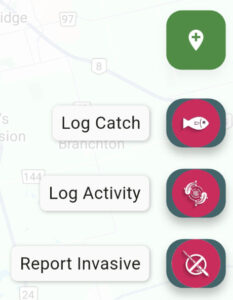
Log Catches
To log a regular catch select the Catch button. A new screen will appear where you can provide your catch details.
Log Activity
Sometimes you may want to log a speical spot that shows potential even though you may not have caught anything. The Activity log button was made for this. Just select Activity to record this special location. You can add notes to remionde you why you like this spot.
Report Invasive
Fishing for invasive species can be a way to help control their populations, but it’s important to be aware of regulations and best practices. Some invasive fish species are even considered game fish where regulations allow, and anglers may be encouraged to keep them. However, it’s crucial to avoid spreading invasive species further and to follow local fishing regulations.
To log an Invasive species catch simply tap the Invasive button and complete the information on the screen. Invasive catches are sent to our online data base where we track these catches to help the enviroment
How to view my catches
You can view your catches by viewing the Home/Map screen or by selecting the List screen.
The Map page will display all of your catches with a fish icon  .
Catches will be displayed within the defined radius of your current location. For example, if you set the radius to 10km then all catches with a 10km radius will be displayed on the map. You can also filter by species types so that only a certain species will be displayed.
.
Catches will be displayed within the defined radius of your current location. For example, if you set the radius to 10km then all catches with a 10km radius will be displayed on the map. You can also filter by species types so that only a certain species will be displayed.
.
Catches will be displayed within the defined radius of your current location. For example, if you set the radius to 10km then all catches with a 10km radius will be displayed on the map. You can also filter by species types so that only a certain species will be displayed.